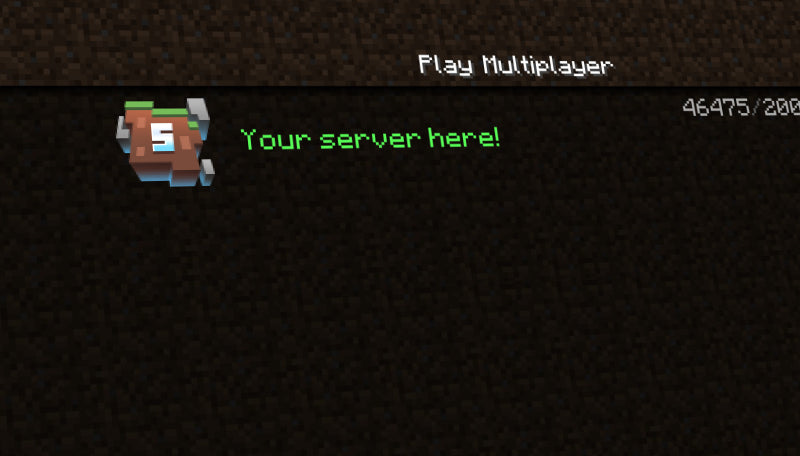
Make a bold first impression with the Clear Sky Server Icon! This advanced 64 × 64 PNG features a vibrant 3D Minecraft world with your server’s custom initials displayed in stunning 3D text. Perfect for catching attention on the in-game server list!
Eye-Catching
Designed to bring life and personality to your server, this unique icon enhances your branding and makes your server stand out from the rest.
Quick & Easy Setup
To apply your custom icon, rename the file to server-icon.png, upload it to your server’s root folder, and restart your server. Your custom 3D design will instantly appear!
Personalized graphics such as banners, logos, and profile graphics are usually delivered to the email on your order within 1–15 minutes after payment is confirmed. Instant downloads are available immediately after checkout. PayPal payment reviews and e-checks can delay when processing starts; no physical item is shipped.
What should I do if my email or download has not arrived?
Wait 15–30 minutes, check your spam or junk folder for an email from contact@woodpunchsgraphics.com, and check the order-status page or your account for download access. If a personalized order is still missing after about an hour, contact us with your order number. Payment reviews can delay processing.
Can I fix a typo or change my text after I order?
Review every field before adding the product to your cart. If you catch a mistake before delivery, contact us promptly with the order number and corrected text. We can often help with a spelling or typo correction, but a full wording change, new design direction, or post-delivery redesign is not included and may require a new order.
What exactly is included with this product?
This is a digital product. The product page’s Graphic information, file-format highlights, selected variant, and options are the source of truth for the files, dimensions, animation, editable sources, and software requirements. If a PSD, AEP, CSH, or other source file is not explicitly listed for your selected option, assume you are receiving the finished digital output only.
How do I install the finished Minecraft server icon?
The standard deliverable is a 64 × 64 PNG. Save it as server-icon.png in your Minecraft server’s main folder, replace the existing file, and restart the server so Minecraft refreshes the icon.
Is this the same thing as a large server logo?
No. A Minecraft server icon is intentionally prepared for the 64 × 64 server-list slot. If you need a larger transparent logo for a website, store, social profile, or branding package, choose a Minecraft Server Logo product instead.
What do I receive if I choose the Photoshop option?
The ready-to-use option is the finished PNG. A Photoshop File option includes the editable PSD only when that option is shown on the product page, and Adobe Photoshop is required to open it. Check the selected variant before checkout.
Can I choose a color or personalize the text?
Some designs offer color choices and text fields, while others are delivered as shown. The product page is the source of truth for available colors and personalization fields. Keep text concise so it remains legible at 64 × 64.
Does a server icon include animation?
A standard Minecraft server icon is a finished PNG, not an animated banner. If a listing includes another format or a special option, it will be stated in that product’s file-format and variant information.
Stand Out on the Multiplayer Server List
Attract more players to your Minecraft server with a professional, eye-catching server icon. Our icons are designed specifically to catch attention on the Multiplayer server list page.
Customer reviews
5.0 out of 5 · 1 review
5.0
Great for the Price
I'm not too tech savvy and really wanted a nice icon for my server, and thanks to Woodpunch's Graphics I was able to get a server icon within a few hours of my purchase :)
Alex WrightReward offered for any rating
Helpful (0)
Questions and answers
No answered questions yet.
Get 15% off your first order
Stay up-to-date with our latest art releases and get 15% off your first order!
Choosing a selection results in a full page refresh.