

FiveM Loading Screen Templates
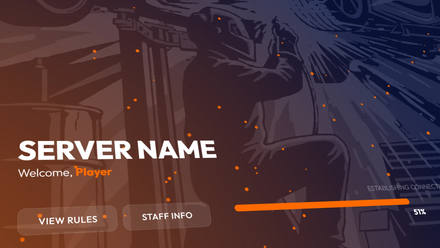
Replace the default FiveM loading screen with an animated one that carries your server's logo. Upload your logo to the Night Raid template and within minutes you get a ready-to-install resource: the video with your logo rendered in, a music player with three tracks, rules and staff popups, and a setup guide. No coding needed.
- Each Loading Screen Includes 3 Free Songs
- Fully Customizable Without Any Coding
- Delivered in Minutes
-
 Sale
Night Raid Animated FiveM Loading Screen Template
Add Your Own LogoRegular price $ 7.99 USDRegular priceUnit price per$ 9.99 USDSale price $ 7.99 USD

FiveM loading screen FAQ
What is a FiveM loading screen?
The screen players see while your server loads after they connect. FiveM lets a server replace the default one with its own page, set with the loadscreen entry in a resource's manifest. Server owners use it to show their logo, rules and staff while players wait.
How do I make a FiveM loading screen?
- Open the Night Raid template.
- Upload your server logo: a PNG, JPG or GIF of up to 10 MB.
- Check out. We render the background video with your logo in it and email the finished package, usually within about 5 minutes.
- Add the resource to your server and start it, following the included guide.
Which designs can I choose from?
One so far: Night Raid, a dark blue and orange design with a tactical team illustration, a progress bar and particles that react to the player's mouse.
What is in the package?
The video with your logo and a version without a logo, the audio files, and the full source of the loading screen as Lua, HTML, CSS and JavaScript, plus a setup and editing guide.
How do I install it on my server?
Upload the delivered resource folder to your server's resources directory and start it in server.cfg. The included guide shows each step, and it is the same way any FiveM resource is installed.
Do I need to know how to code?
No. Colors, text, music, rules and staff are set in one configuration file. The source code is included for anyone who wants to change more.
Does it work with ESX, QBCore and vMenu?
Yes. The loading screen is standalone, so it does not depend on a framework and runs on ESX, QBCore, vMenu and other setups.
Can I use my own music?
Yes. It comes with three demo songs, and the player supports your own playlist, volume control and start times.
Can I show my server rules and staff?
Yes. Two optional popups show your server rules and your staff list with avatars before players spawn.
What resolution is the loading screen?
It scales to the player's screen, from 1080p up to 4K.
What kind of logo should I upload?
The clearest, largest version you have. A PNG with a transparent background looks best. If you upload a GIF, its first frame is used as a still image. Your logo does not appear in the preview on the product page; it is placed when your video is rendered.
How fast do I get my loading screen?
By email, usually within about 5 minutes after payment. A PayPal payment review or an e-check can delay the start. Nothing is shipped; it is a digital download.
Where can I learn more about running a FiveM server?
Start with the 20 best FiveM scripts for RP servers and how to set up a FiveM Discord whitelist. For the Discord that goes with your server, see the Discord server banners.