Skip to product information
1 of 13

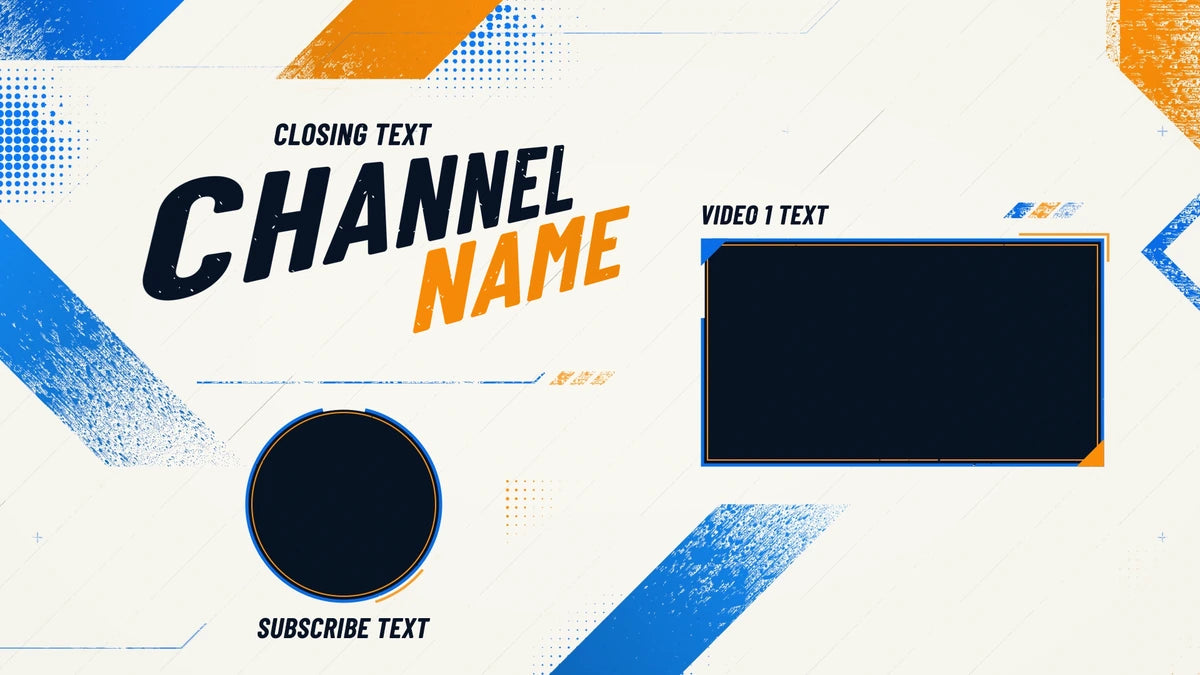
Overdrive Gaming YouTube End Screen Template

Overdrive Gaming YouTube End Screen Template

New
Regular price $ 4.99 USD
Regular price Sale price $ 4.99 USD
Sale Sold out

  • Top-quality professional design
  • Your channel name is added
  • Personalized MP4 video
  • Six colors · one or two videos
Color: Classic Orange and Blue
Videos

Your purchase is subject to our Digital Product License.

Finish your gameplay videos with Overdrive, an animated gaming YouTube end screen built around bold typography, diagonal brush trails and shifting halftone details. Crisp video frames and a matching Subscribe space keep the next step clear while the background stays in motion.

Make it your own with your channel name, closing message, video labels and Subscribe text. Choose six color combinations and a one- or two-video layout. Classic Orange and Blue with two videos is the default.

  • Personalized 20-second MP4 video, 1920 × 1080 pixels, 30 fps
  • Six colors and one or two video spaces, plus a Subscribe space
  • Animated text, rotating frame reveals and a short fade to black
  • Finished video download with no audio; no After Effects editing required

Append your MP4 to the end of your video in your video editor, then add clickable video and Subscribe elements in YouTube Studio over the matching spaces. End screens are available in the final 5–20 seconds of eligible videos at least 25 seconds long, and are unavailable on videos set as made for kids. Editable project files, fonts, music and video thumbnails are not included.

View full details

Graphic information

  • Video dimensions
    1920 × 1080 px
  • Duration
    20 seconds
  • Frame rate
    30 fps
  • File format
    MP4 (H.264)

Common Questions

When will I receive my digital order?

This personalized end screen is rendered automatically after payment is confirmed. Allow about 5–30 minutes per end screen, depending on your text and layout. Queue traffic, PayPal payment reviews and e-checks can add time. Your finished MP4 is sent to the email on your order and is available on the order-status page or in your account. No physical item is shipped.

What should I do if my email or download has not arrived?

Wait 15–30 minutes, check your spam or junk folder for an email from contact@woodpunchsgraphics.com, and check the order-status page or your account for download access. If a personalized order is still missing after about an hour, contact us with your order number. Payment reviews can delay processing.

Can I fix a typo or change my text after I order?

Review every field before adding the product to your cart. If you catch a mistake before delivery, contact us promptly with the order number and corrected text. We can often help with a spelling or typo correction, but a full wording change, new design direction, or post-delivery redesign is not included and may require a new order.

What exactly is included with this product?

This is a digital product. The product page’s Graphic information, file-format highlights, selected variant, and options are the source of truth for the files, dimensions, animation, editable sources, and software requirements. If a PSD, AEP, CSH, or other source file is not explicitly listed for your selected option, assume you are receiving the finished digital output only.

What do I receive, and do I need After Effects?

You receive one finished 20-second MP4 video at 1920 × 1080 pixels and 30 fps, personalized with your text, selected color and one- or two-video layout. No After Effects editing is required. Editable AEP projects, fonts, music and video thumbnails are not included.

How do I make the video and Subscribe spaces clickable?

Append your MP4 to the end of your video in your video editor, then upload the complete video to YouTube. In YouTube Studio, add video and Subscribe end-screen elements over the matching spaces. The animation contains decorative frames; the clickable elements come from YouTube Studio.

Which text can I customize?

Enter your channel name, closing text, Video 1 text and Subscribe text. The two-video layout also includes Video 2 text. The channel name is required; the other labels can be left blank. Review the spelling and the character limits shown in the form before ordering.

Can I use this with every YouTube video?

YouTube end screens are available during the final 5–20 seconds of eligible videos that are at least 25 seconds long. They are unavailable on videos set as made for kids. Add this 20-second outro to a longer video and configure the clickable elements in YouTube Studio. YouTube can adjust how end screens appear depending on the viewer and device.

Customer reviews

No reviews yet

0

Be the first to review this product.

Questions and answers

No answered questions yet.